
FAQ
Ring Connection & Hardware
Why does my Merit Ring auto log out or disconnect?

You may be signed out after along period of inactivity, or after a major app update. Simply sign in againusing the same email address — your account and data will be there as before.
How do I fix Bluetooth connection issues?
Work through these steps in order — most connection issues clear up within the first two or three:
1. Make sure Bluetooth is turned on in Settings > Bluetooth (not just the Control Centre shortcut).
2. Check that the app has Bluetooth permission: Settings > Do Merit > Bluetooth.
3. Keep the ring within about a metre of your phone, and make sure it is charged.
4. Fully close the app and reopen it.
5. If it still will not connect, open Settings > Bluetooth, find the ring, tap the info icon, and choose Forget This Device. Turn Bluetooth off and back on, then reopen the app and connect again.
6. If it still not working, please refer to FAQ 10 for assistance.
What should I do if the Merit Ring keeps disconnecting and reconnecting?
To protect your privacy, Merit Ring intentionally disconnects from the ring when you exit the app - preventing any background data collection to track or collect your signal while you are away. Reconnecting when you reopen the app is standard behaviour to keep your data safe, not a glitch.
If the connection keeps dropping while you are actively using the app:
o Charge the ring fully. A low battery weakens its Bluetooth signal.
o Keep the ring within about a metre of your phone while wearing it.
o Move away from other Bluetooth accessories or busy Wi-Fi routers, which can interfere with the connection.
o If the problem persists, open Settings > Bluetooth, choose Forget This Device, and pair the ring again.
What do the indicator lights show?
1.Green Light:
Collecting PPI, use to formulates, Heart Rate, Emotions and Stress.
2.Red Light:
Collecting PPI, use to formulate SpO23.
3. Solid Light when fully charging?
PPG green light is an indication of charging status. Solid Light when charging. Light will go off after a while.
Battery %?
Your ring's battery level is shown in the app under the ring's details, alongside Model and Serial Number. It occasionally reads 0% or -- immediately after reconnecting; closing and reopening the app refreshes it.
Emotions, Moods & Charts
How does the real-time emotion/mood chart work?
The ring continuously reads yourpulse interval data, and the app turns that into a mood reading — how calm oractivated you are, and how positive or difficult the moment feels — then plotsit on your chart for that day.
1. Update Frequency?
A new mood reading appearsroughly every 4 minutes. The ring sends a batch of data every 2minutes, and the app needs around 3 minutes of continuous data tocalculate a single mood reading. So from the moment you put the ring on, expectyour first new reading after about 4 minutes of wear.
2. Chart Views?
Each day has its own view, witha calendar to move between days. The chart plots every mood reading from thatday alongside your overall midline for the day, and highlights the moment youdrifted furthest from it.
Privacy, System & Support
Where is my privacy and personal data stored?
Your privacy matters to us. Weare committed to protecting your personal data with standard-setting security.Here is how we handle and protect what you share with us:
- Your Device: Your sign-in infois stored in your phone's secure, encrypted storage—never in plain text.
- Our Servers: Account details,journal entries, community posts, and mood insights are kept in our manageddatabase. Any shared photos or audio are stored securely in the cloud.
- Essential Data Only: Westrictly collect what the app needs to function (email, account ID, device ID,pulse data, derived moods, and created content).
Most importantly, we never useyour data to track you across other apps or websites.
Are there differences between the iOS and Android apps?
The features are the same onboth platforms. The differences are all under the hood:
o Android asks for a couple ofadditional Bluetooth permissions the first time you connect a ring (forscanning and for nearby devices). iOS handles this with a single Bluetoothprompt.
o Reconnecting to the ring canoccasionally take slightly longer on Android, due to a quirk in how Android'sBluetooth stack reports a connection. The app already accounts for thisautomatically.
What is the coverage period for the product warranty, eligibleexchanges or full refunds?
- Warranty Coverage: 12-Month Full Protection againstmanufacturing defects.
- Resolution: Free repair or brand-new replacement for verified issues.
- Return: All purchases are non-refundable.
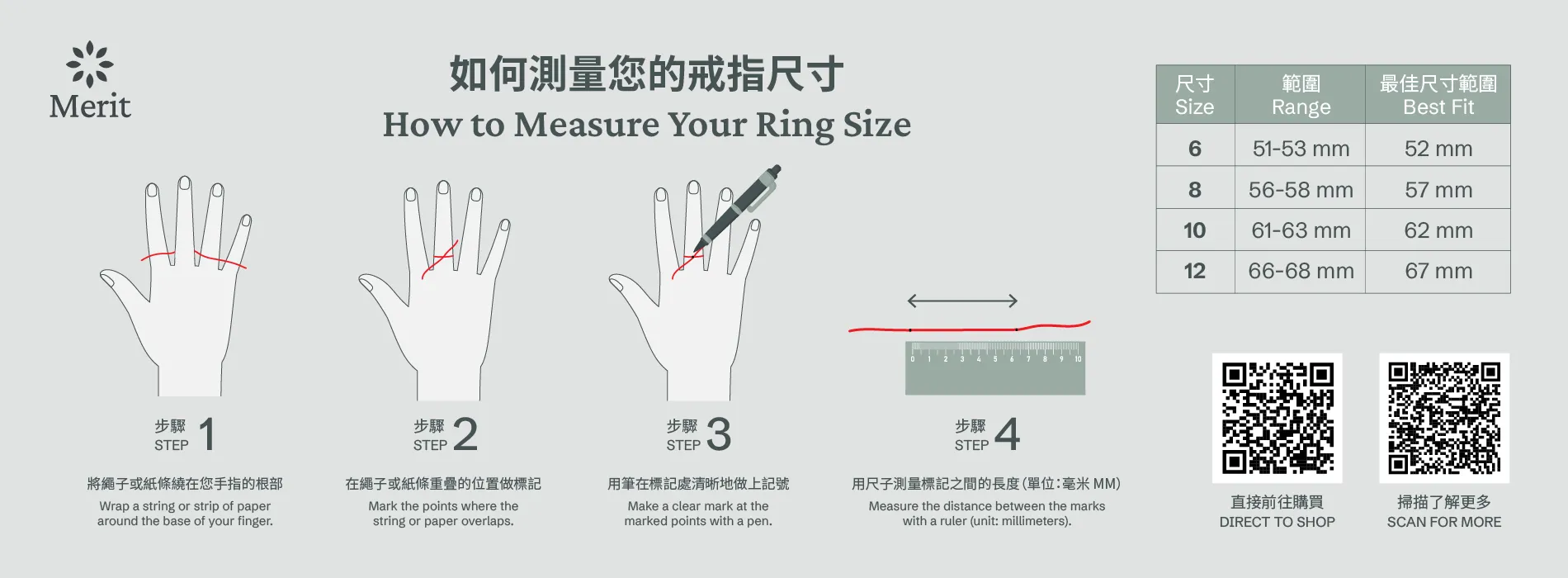
Where can I visit to try on the rings in person, ring size guideprovided? (attached document for ring size)?
Make an appointment with us by email : marketing@domerit.org
You can try on the rings at : 32/F Room, Hysan Place, 500 HennessyRoad, Causeway Bay, Hong Kong
Who to contact for enquiries, any support channels or locations Ican reach your team for assistance?
Email to us : marketing@domerit.org
Fill in the form online : https://domerit.org/#cont
Make an appointment for assistance at : 32/F Room, Hysan Place, 500Hennessy Road, Causeway Bay, Hong Kong
